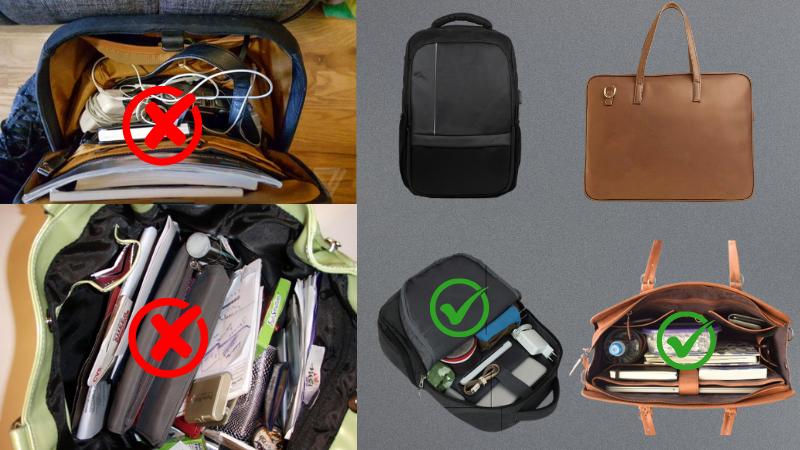
Choose a Bag That Works for Your Daily Travel
The foundation of staying organized starts with the right kind of laptop bag. If you’re carrying a laptop, charger, mouse, mouse pad, Bluetooth devices, dongle, notebook and more, a single-compartment bag just won’t cut it. What you need is a multi-compartment laptop bag with a dedicated padded section for the laptop itself, and several zipped or mesh pockets for small accessories. A good work bag should have separate zones: one for your laptop, one for documents or notebooks, and another for accessories. A small front or top pocket for quick access to essentials like keys, ID card, or earbuds is also a huge plus. Make sure the material is water-resistant, lightweight, and designed to support your shoulders during long commutes.
Pack Your Accessories Like a Pro
Once you’ve got the right bag, the real secret lies in how you arrange your gear. Always place your laptop in the rear padded compartment, keeping it close to your back to balance weight. The middle section should be reserved for notebooks, files, or documents to prevent them from bending. Your mouse, charger, and other small items like dongles or Bluetooth earphones should each have their own space. If the bag doesn’t offer dedicated slots, using small zippered pouches can make a huge difference. Label or color-code your pouches for easy identification—one for charging equipment, one for USB and Bluetooth items. This system keeps everything in place and ensures you never have to waste time searching.
Fold Cables the Right Way to Avoid Tangles
Cables are one of the main culprits when it comes to messy bags. Learning how to fold them properly will prevent tangling and extend their life. For longer cables like laptop chargers, the over-under technique is perfect. Alternate the direction of each loop to create a natural coil that doesn’t twist or strain the wire. Use a Velcro strap or small rubber tie to hold it in place. For wired mouse cables or earphone wires, the figure-8 method works great. Wrap the cable in a figure-8 around two fingers, then loop the remaining end around the center to lock it. For shorter Bluetooth charger cables, loose coiling and tucking them inside a soft pouch works best. Avoid wrapping cables tightly around devices, especially the charger brick, as it can damage the wire over time.
Keep Bluetooth and Small Gadgets Secure
Bluetooth devices like wireless earphones, mini speakers, or Bluetooth dongles are easy to misplace in a loosely packed bag. Always store them in a soft fabric pouch or a zippered section of your bag so they don’t roll around or get scratched. If your bag has a small front or top pocket, that’s a great spot to keep wireless devices for quick access. Keeping Bluetooth accessories together with their charging cables in the same pouch will also help you keep everything in sync and ready to use when needed.
A Little Effort Brings Daily Peace
Packing your laptop bag efficiently might take an extra minute in the morning, but it saves you far more time—and frustration—when you reach your office. Think of your bag as a mobile office drawer. It should be clean, categorized, and ready to go. A structured bag and a consistent layout will protect your tech gear, reduce cable damage, and even improve your mood as you begin your day. The more intentional you are about organizing, the easier your daily routine becomes.
Your Bag Shouldn’t Add to Your Commute Stress
A well-organized laptop bag can truly transform your daily experience. From choosing the right bag with proper compartments to folding cables correctly and packing Bluetooth devices safely, every small habit adds up. With these methods, you’ll spend less time untangling cords and more time focusing on what matters. So the next time you walk into your office after a long commute, your bag won’t slow you down—instead, it will help you get straight to work, effortlessly.